
Share:

Understanding In-Game Currencies: A Player's Guide to Cash, Virtual Currency, Gems and Vouchers
A clear guide to in-game currencies: stored balances, premium gems and vouchers, how to read top-up price lists and how to buy the right amount safely.
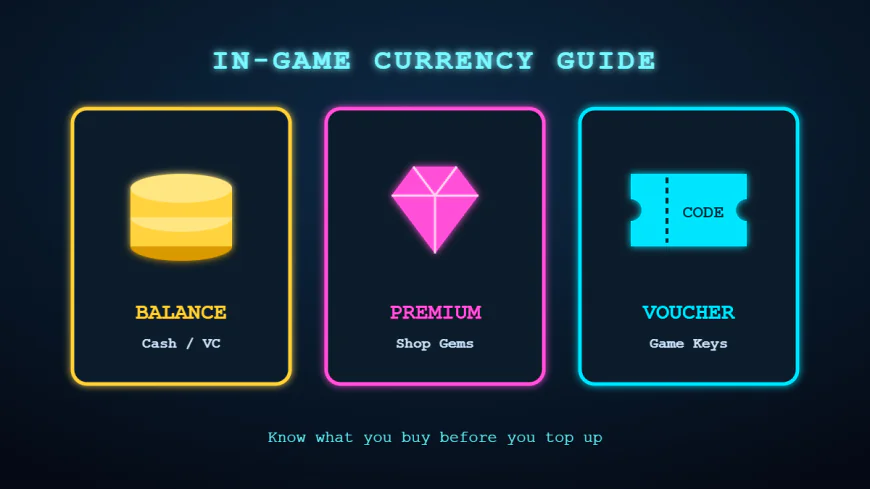
Open almost any modern game and you will find a store filled with coins, gems, credits, cash or points. For new players this can be confusing: why does one game sell "NX" while another sells "VC", and why are some titles sold only as vouchers? Understanding how in-game currencies work is the first step toward spending wisely, avoiding leftover balances and getting real value from every purchase.
This guide breaks down the most common currency models, explains how they differ across popular titles such as MapleStory, WWE 2K24, Conan Exiles, Fatal Fury 3 and Palworld, and shares practical tips for buying the right amount every time.
What Is an In-Game Currency?
An in-game currency is a digital unit that you buy with real money and spend inside a specific game or platform. Publishers use these currencies for several reasons. They simplify pricing across many countries, they let the store bundle items in creative ways, and they make it easy to run sales and events. For players, the key point is that the currency usually has value only within its own ecosystem. Once you buy it, it cannot normally be refunded, transferred to another game or converted back to money.
That is why the decision happens before the purchase. Knowing exactly what you want to buy, and how much currency it requires, protects you from paying for units you will never use.
The Three Main Models You Will Meet
1. Stored Balance Currencies
The most familiar model is a balance that sits in your account until you spend it. MapleStory's Nexon Cash is a classic example: you top up a set amount, then use it in the Cash Shop for cosmetics, convenience items and premium features. Sports and wrestling titles, including WWE 2K24, use a similar approach with Virtual Currency that unlocks upgrades, characters and modes.
Stored balances are flexible because you can save them for later events. The drawback is that bundles rarely match item prices exactly, so it is easy to end up with small leftovers.
2. Premium Shop Currencies
Some games separate free currency earned through play from premium currency bought with money. Survival and crafting titles such as Conan Exiles often follow this pattern, with premium currency used for cosmetic packs from an in-game bazaar while core progression stays free. This model is generally player-friendly, since paying focuses on appearance rather than power, but it rewards careful planning because cosmetic rotations change often.
3. Vouchers and Game Keys
Not every purchase involves a balance. Many games, especially premium titles and classic re-releases, are sold as vouchers or digital keys. Fatal Fury 3 and Palworld are commonly bought this way: you receive a code, redeem it on the relevant platform, and the game or content is added to your library. There is nothing to "spend down", which makes vouchers simple and predictable.
How to Read a Top-Up Price List
When you visit a store, you will usually see a list of nominal amounts with a price beside each one. To compare them properly, calculate the cost per unit by dividing the price by the amount of currency. Larger bundles often offer a better rate, but that only matters if you will use the extra units.
Specialist stores make this easier. On VIRTUALLY ALIGNED, for example, each game is presented with its currency name, the account data required, and every nominal option with its rupiah price, so you can quickly match a bundle to the item you are aiming for. That kind of layout turns a confusing decision into a simple comparison.
Matching Currency to What You Want to Buy
The smartest approach is to start from the item, not the bundle. Here is a simple process:
- Write down the exact price of each item, pass or pack you plan to buy in the near future.
- Add the prices together to find your target total.
- Look at the available nominal options and choose the smallest combination that covers your total.
- If the leftover would be large, consider waiting until you have another planned purchase so the bundle is fully used.
Using a reliable Top Up Saldo Game service with transparent pricing helps here, because you can see all the options together and avoid the temptation of an oversized package shown first in the game client.
Regional and Platform Considerations
Currencies and vouchers are often tied to a region, server or platform. A code meant for one region may not redeem in another, and currency bought on one console may not appear on PC. Before buying, confirm three details: your account ID, the server or region you play on, and the platform you use. Good stores ask for exactly this information and nothing more.
Share:
More in Technology
View categoryGenesis Crystals vs Welkin Moon: Smart Ways to Top Up Genshin Impact on a Budget
Genesis Crystals or Welkin Moon? Compare value, learn how pity works, and follow simple budgeting habits to top up Genshin Impact smartly without overspending.
READ ARTICLEComing Back to Your Favorite Games: How Smart Top Ups and Vouchers Make the Return Worth It
Returning to an old favorite game? Learn how to restart without feeling lost, genre-by-genre comeback tips, and how game vouchers and top ups make the return smoother.
READ ARTICLEDEX GAME Guide: Building Your PC Game Collection with Steam Wallet, Game Keys and DLC
How to build a PC game collection on a budget with Steam Wallet credit, game keys and DLC, plus where Apex Coins top ups fit in and how to buy safely.
READ ARTICLEMechanical Keyboard Guide for Gamers: Switches, Layouts and Keycaps Explained
A complete mechanical keyboard guide for gamers: linear, tactile and clicky switches, keyboard sizes, keycaps, rapid trigger and tips to build a keyboard that suits your playstyle.
READ ARTICLE