
Share:

Mechanical Keyboard Guide for Gamers: Switches, Layouts and Keycaps Explained
A complete mechanical keyboard guide for gamers: linear, tactile and clicky switches, keyboard sizes, keycaps, rapid trigger and tips to build a keyboard that suits your playstyle.
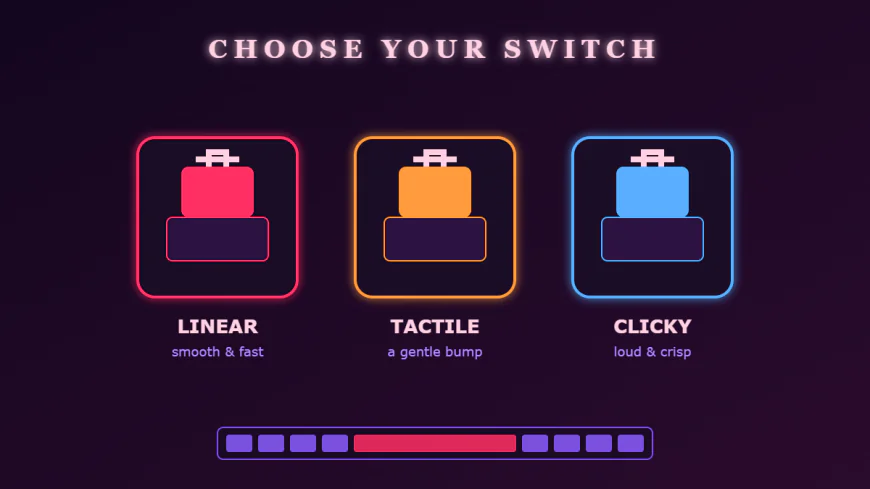
Ask any long-time PC gamer about the upgrade that changed their experience the most, and many will name the same thing: their first mechanical keyboard. The satisfying feel of each keystroke, the consistent response and the endless room for personalisation make mechanical boards a favourite among casual players, competitive grinders and streamers alike. But with dozens of switch types, layouts and keycap materials to choose from, finding the right one can be confusing. This guide walks you through everything that matters, step by step, so you can choose a keyboard that suits both your games and your hands.
If you want to compare keyboards side by side with other gear before deciding, browsing a dedicated gaming gear hub like PINTU EXPLORE can save a lot of time. Seeing keyboards next to mice, headsets and monitors helps you plan a setup that looks and feels consistent rather than a random collection of parts.
What Makes a Keyboard "Mechanical"?
Most budget keyboards use a single rubber membrane beneath the keys. When you press a key, the rubber dome collapses and completes a circuit. It works, but the feel can be mushy and inconsistent, especially as the rubber wears out. A mechanical keyboard uses an individual switch under every key, each with its own spring and moving parts. The result is a more precise, consistent and durable typing experience. Many mechanical switches are rated for tens of millions of keystrokes, so a quality board can easily last for years of daily gaming.
The Three Main Switch Types
The switch is the heart of a mechanical keyboard. While there are hundreds of variants, they all fall into three families:
- Linear switches move straight down with no bump or click. They feel smooth and fast, which is why many FPS and rhythm game players love them. They are also among the quieter options.
- Tactile switches have a small bump partway through the press that tells your finger the key has registered. They are a great all-rounder for players who also type a lot, because the bump helps prevent bottoming out.
- Clicky switches combine a tactile bump with an audible click. They are fun and satisfying, but loud. If you stream, use voice chat often or share a room, a clicky board may annoy the people around you.
Beyond the feel, pay attention to actuation force (how hard you need to press) and actuation point (how far the key travels before it registers). Lighter switches with a shorter actuation point allow faster repeated presses, while heavier switches reduce accidental keystrokes.
Magnetic and Rapid Trigger Keyboards
One of the biggest recent trends is the magnetic, or Hall effect, keyboard. Instead of a metal contact, these switches use magnets and sensors to measure exactly how far each key is pressed. This makes it possible to adjust the actuation point for each key in software. Many of these boards also support rapid trigger, which resets a key the moment you start lifting your finger rather than waiting for it to pass a fixed point. In tactical shooters, this allows extremely quick counter-strafing and movement. If you play competitive FPS titles seriously, a magnetic keyboard is well worth considering.
Choosing the Right Size and Layout
Keyboards come in several common sizes, and each suits a different style of play:
- Full-size (100%) – includes the number pad. Ideal if you also work with spreadsheets or numbers, but it takes up a lot of desk space.
- Tenkeyless (TKL / 80%) – removes the number pad while keeping arrow keys and function row. A popular balance for gaming and productivity.
- 75% and 65% – compact boards that keep arrow keys but squeeze or remove the function row and navigation cluster.
- 60% – very compact, with no arrows or function row as dedicated keys. Favoured by players with low mouse sensitivity who need maximum room to swing their arm.
A smaller keyboard gives your mouse more space and brings it closer to the centre of your body, which can improve posture and reduce shoulder strain. However, think about which keys you genuinely use before going too small.
Keycaps: Material, Profile and Legends
Keycaps affect both how a keyboard feels and how it sounds. The two most common plastics are ABS and PBT. ABS keycaps feel smooth and can display vivid colours, but they develop a shiny surface over time. PBT keycaps have a slightly textured, dry feel and resist shine for much longer, making them a durable choice for heavy use.
Keycap profile describes the shape and height of each row. Some profiles are low and flat, others are tall and sculpted. There is no single best option; it comes down to what feels comfortable under your fingers. Many gamers also enjoy themed keycap sets to match the colour scheme of their room, turning the keyboard into a centrepiece of the desk.
Hot-Swappable Boards and Customisation
A hot-swappable keyboard lets you pull switches out and replace them without soldering. This is perfect if you are not yet sure which switch type you prefer, because you can experiment and change your mind later. Customisation goes deeper too: some enthusiasts lubricate their switches, add foam to reduce hollow sounds or tune stabilisers so long keys like the spacebar sound clean. You do not need to do any of this to enjoy a mechanical keyboard, but it is a rewarding hobby if you like tinkering.
Software, Lighting and Connectivity
Good companion software allows you to remap keys, create macros and save profiles for different games. RGB lighting is mostly about style, but per-key lighting can also highlight important keys for a particular game. As for connectivity, wired keyboards remain the simplest choice with no batteries to worry about. Modern wireless boards with 2.4 GHz receivers are fast enough for gaming and help keep the desk tidy, while Bluetooth is convenient for switching between a laptop, tablet and phone.
Ergonomics: Protecting Your Wrists
Share:
More in Technology
View categoryDEX GAME Guide: Building Your PC Game Collection with Steam Wallet, Game Keys and DLC
How to build a PC game collection on a budget with Steam Wallet credit, game keys and DLC, plus where Apex Coins top ups fit in and how to buy safely.
READ ARTICLESinggasana Sang Gamer: Rahasia Menata Ruang Bermain yang Nyaman dan Berkarakter
Tips menata ruang bermain yang nyaman, rapi, dan berkarakter: dari kursi ergonomis, posisi monitor, tema warna RGB, hingga manajemen kabel.
READ ARTICLETips Aman Top Up Diamond dan Voucher Game: Cukup ID Akun, Jangan Pernah Bagikan OTP
Panduan aman top up diamond dan voucher game: cukup bagikan ID akun, kenali modus penipuan, dan jangan pernah memberikan kata sandi atau kode OTP.
READ ARTICLEHow Do I Choose Therapy Scheduling Software? 7 Checks Before You Commit
Wondering what to look for in therapy scheduling software? Compare reminders, calendar tools and HIPAA basics to cut no-shows and save hours of admin time.
READ ARTICLE