
Roadmap to a Stunning Elementor Website: A Step-by-Step WordPress Tutorial
From domain setup and installation to designing with Elementor's drag-and-drop editor and launching a fully responsive site, this visual roadmap makes building your professional website simple and intuitive.
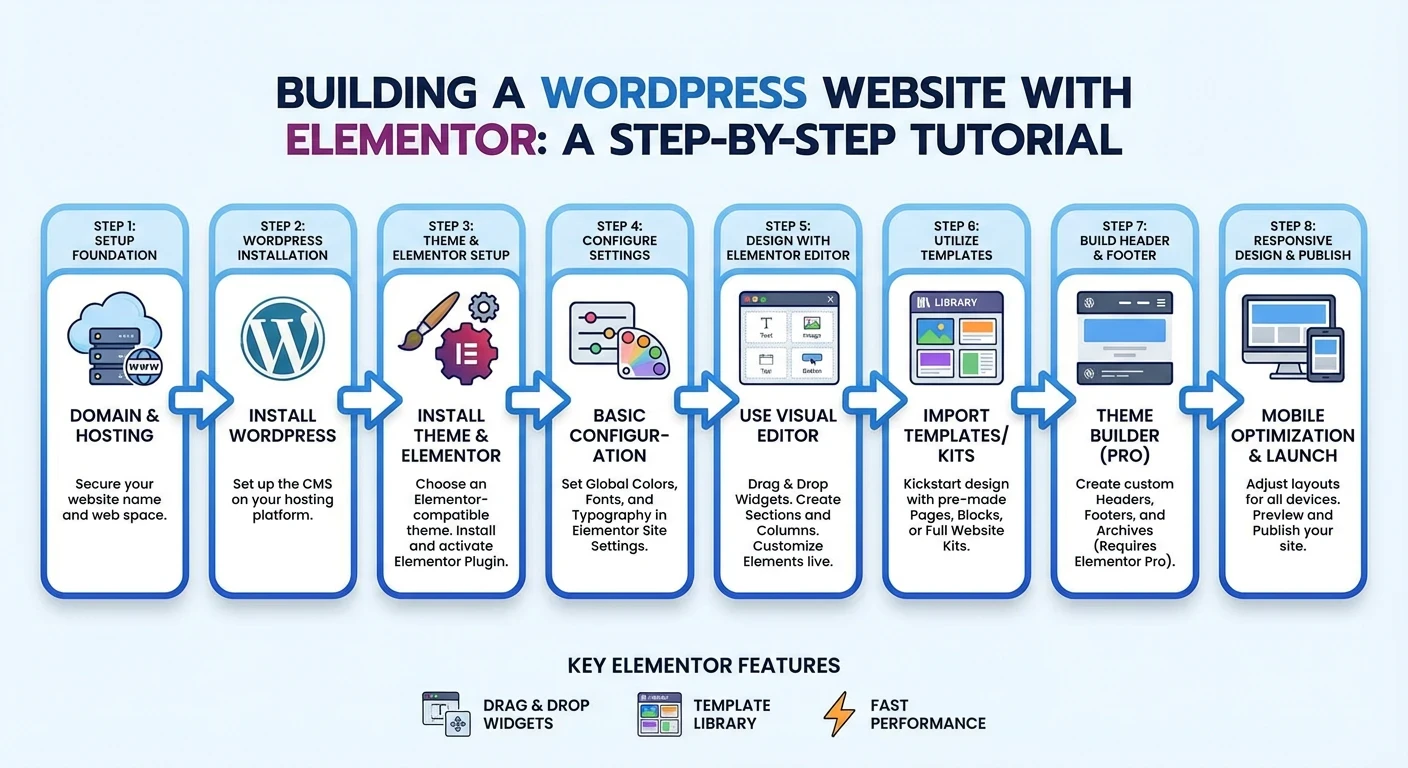 In the early days of the internet, building a website felt like learning a secret language. You needed to know HTML, CSS, and perhaps a bit of PHP just to get a simple page online. Today, that barrier to entry has been shattered. Thanks to tools like WordPress and the Elementor page builder, creating a professional, visually stunning website is no longer a task reserved for developers—it’s a creative journey open to everyone.
If you have been dreaming of launching a personal portfolio, a business site, or an online store, but feel intimidated by the technical side of things, you are in the right place. This guide outlines the roadmap to building a stunning Elementor website, taking you from zero to launch without writing a single line of code.
Phase 1: laying the Foundation (Setup & Installation)
Before the design magic happens, you need a home for your website. Think of this phase as buying a plot of land and pouring the concrete foundation.
- Domain & Hosting: Your journey begins with securing a domain name (your website's address, like
yoursite.com) and a hosting plan. Reliable hosting is crucial for site speed and security. Many hosts offer "One-Click WordPress Installation," which simplifies the process immensely. - Installing WordPress: Once your hosting is active, you’ll install WordPress. It is the operating system of your website—flexible, powerful, and free.
- Theme Selection: While Elementor will handle the design, you need a lightweight theme to act as a canvas. Themes like Hello Elementor or Astra are perfect because they are fast and designed specifically to work seamlessly with page builders.
Phase 2: Unlocking the Power of Elementor
This is where the fun begins. Elementor is a "WYSIWYG" (What You See Is What You Get) editor. It replaces the standard, rigid WordPress editor with a live, drag-and-drop interface.
- Plugin Installation: Navigate to the "Plugins" section of your WordPress dashboard, search for "Elementor," and click install. Once activated, you have immediate access to a suite of design tools.
- The Interface: When you open a page with Elementor, you’ll see your website on the right and a sidebar of widgets on the left. You can drag elements like headings, images, buttons, and videos directly onto the page.
Phase 3: Designing Your Masterpiece
You don’t need a degree in graphic design to make your site look good. Elementor provides the tools to ensure consistency and style.
- Templates & Blocks: Stuck on a blank page? Elementor offers a library of pre-made templates. You can insert a full page design or specific "blocks" (like a Contact Us section or a Hero banner) and simply swap out the text and images to match your brand.
- Customization: Every element is customizable. You can tweak typography, change colors, add shadows, and adjust margins with intuitive sliders. This allows you to maintain brand consistency across every page.
Phase 4: Ensuring Responsiveness
A stunning website isn’t just about how it looks on a desktop computer; it’s about how it performs in the palm of a hand. Mobile traffic accounts for approximately half of all web traffic worldwide.
Elementor includes a Responsive Mode. With a click, you can switch your view to see how your site looks on a tablet or smartphone. You can adjust font sizes, hide specific elements, or change layout padding specifically for mobile devices, ensuring your site looks perfect on any screen size.
Phase 5: Launch and Beyond
Once you have arranged your layout, optimized your images, and double-checked your links, it is time to hit Publish. But the roadmap doesn't end there. The beauty of a WordPress + Elementor site is its scalability. As your business grows, you can easily add new pages, integrate marketing tools, or upgrade to Elementor Pro for even more advanced features like custom headers and footers or dynamic content.
Conclusion
Building a website used to be a technical hurdle; now, it is a creative opportunity. By following this roadmap—from the initial setup to the final mobile check—you can take ownership of your digital presence. Whether you are a beginner or an entrepreneur looking to save costs, the combination of WordPress and Elementor gives you the power to build something truly stunning.
Ready to see this process visualized? Check out our full blog here to start your journey today!